








































Hostel
Keeps the hostels, their rooms and beds, and who stays where: allocating a student to a room and vacating the bed when they leave.
| At a glance | |
|---|---|
| Type | Business module |
| Group | Learn |
| Needs | Nothing (residents are contacts, usually students) |
| Included in | Schools & colleges, PG & student housing |
| Offered to | Schools & colleges, Classes & coaching, PG & student housing, Trusts & non-profits |
| Permissions | View hostels (hostel.view), Manage hostels (hostel.manage) |
Switching it on
Workspace → Modules → Hostel → Enable (needs Manage modules). Hostel appears under Learn.
Hostels and rooms
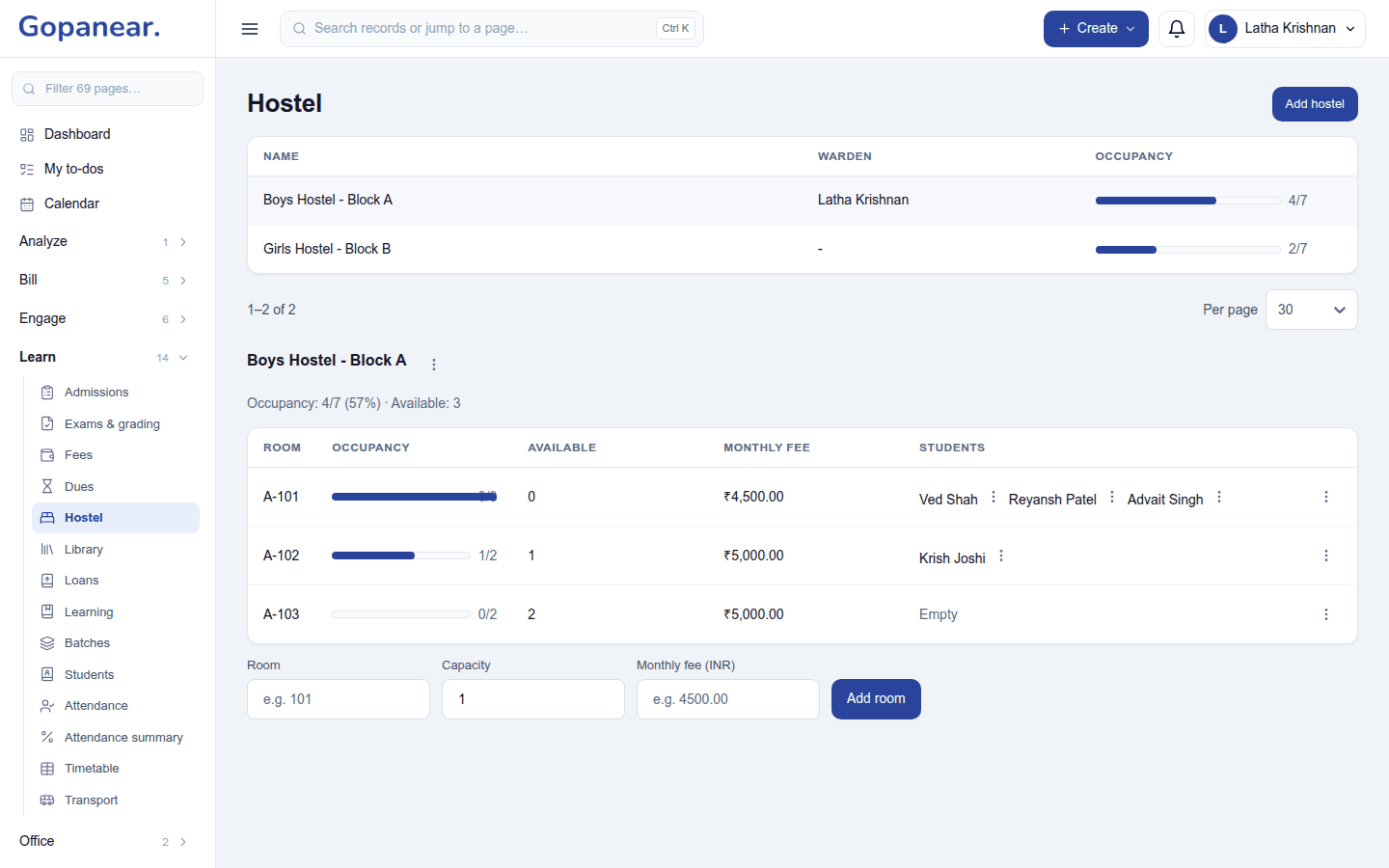
Learn → Hostel lists the hostels with their warden and occupancy (beds taken of beds there). Add hostel asks for a name (for example Boys Block A) and, optionally, the warden, a staff member.
Click a hostel to see its rooms. The heading shows the hostel's occupancy as a figure and a percentage, and how many beds are free. Each room shows:
- its room number, an occupancy bar (beds taken of its capacity) and how many beds are available;
- its monthly fee;
- the students in it, each with a ⋮ menu to Vacate the bed.
Add a room with the row under the list: Room, Capacity (beds) and Monthly fee, then Add room. A room's ⋮ menu offers Allocate student, Edit and Delete.
Allocating a bed
On the room's ⋮ menu, choose Allocate student, pick the student and the date, and save. The room's occupancy and the hostel's figures update at once. Two allocations are refused with a reason: a full room (This room is full.) and a student who already has a room (This student is already allocated a room.). A room's capacity cannot be lowered below the students in it. Vacate frees the bed for someone else (it asks first).
The monthly fee is a record of what the room costs, shown beside it. The hostel does not raise invoices by itself; bill the fee through Fees.
Deleting: an occupied room, or a hostel with anyone in it, cannot be deleted.
Permissions
| Permission | Allows |
|---|---|
View hostels (hostel.view) |
See hostels, rooms and who stays where. |
Manage hostels (hostel.manage) |
Add hostels and rooms, allocate and vacate beds. |
Ready-made automations
None. Allocations are made by staff on the spot.
Turning it off
Hostel leaves the menu. Hostels, rooms and allocations are kept.
In the desktop and mobile apps
A PG & hostel workspace has two apps (see the hostel apps):
- Hostel Desk on the office computer: the Beds screen is this page. With no internet it shows the buildings, rooms and residents the computer last synced, and Vacate still works: the bed frees at once, marked Waiting to sync, and the move-out is sent when the internet is back. Allocating a bed, adding a building or a room and editing one need the internet, and the screen says so.
- Hostel Caretaker on a phone: every room by building with its residents and free beds, and a resident moved out from the room's sheet, with no signal too.
A School workspace with the Hostel module has School Desk too (see the school apps), whose Beds screen is this page with the same offline half.
A move-out the server refuses (someone else moved the resident out first, or the person has no right to) is shown with the server's reason, and can be dismissed.
Related guides
- Student information (SIS), Fees, Reservations (room stays for paying guests)
- Module guides index