








































Subscriptions
Sells things on repeat (memberships, retainers, maintenance plans, monthly boxes) and bills each subscriber by itself every period, with upgrades, pauses, fixed terms, close reasons and recurring revenue.
| At a glance | |
|---|---|
| Type | Business module |
| Group | Sell |
| Needs | Nothing. Each bill is an ordinary invoice. Automatic payment of the bills needs Payments with a gateway that saves a card or account (Stripe, PayPal, Braintree, Adyen, Razorpay, Cashfree or PayU). |
| Included in | Gym & coaching, Classes & coaching, Clinics, Trusts & non-profits, Salon & spa and others |
| Offered to | Every industry pack |
| Permissions | View subscriptions (subscriptions.view), Manage subscriptions (subscriptions.manage) |
Switching it on
Workspace → Modules → Subscriptions → Enable (needs Manage modules). Subscriptions appears under Sell, and Settings gains its page.
Plans and subscribers
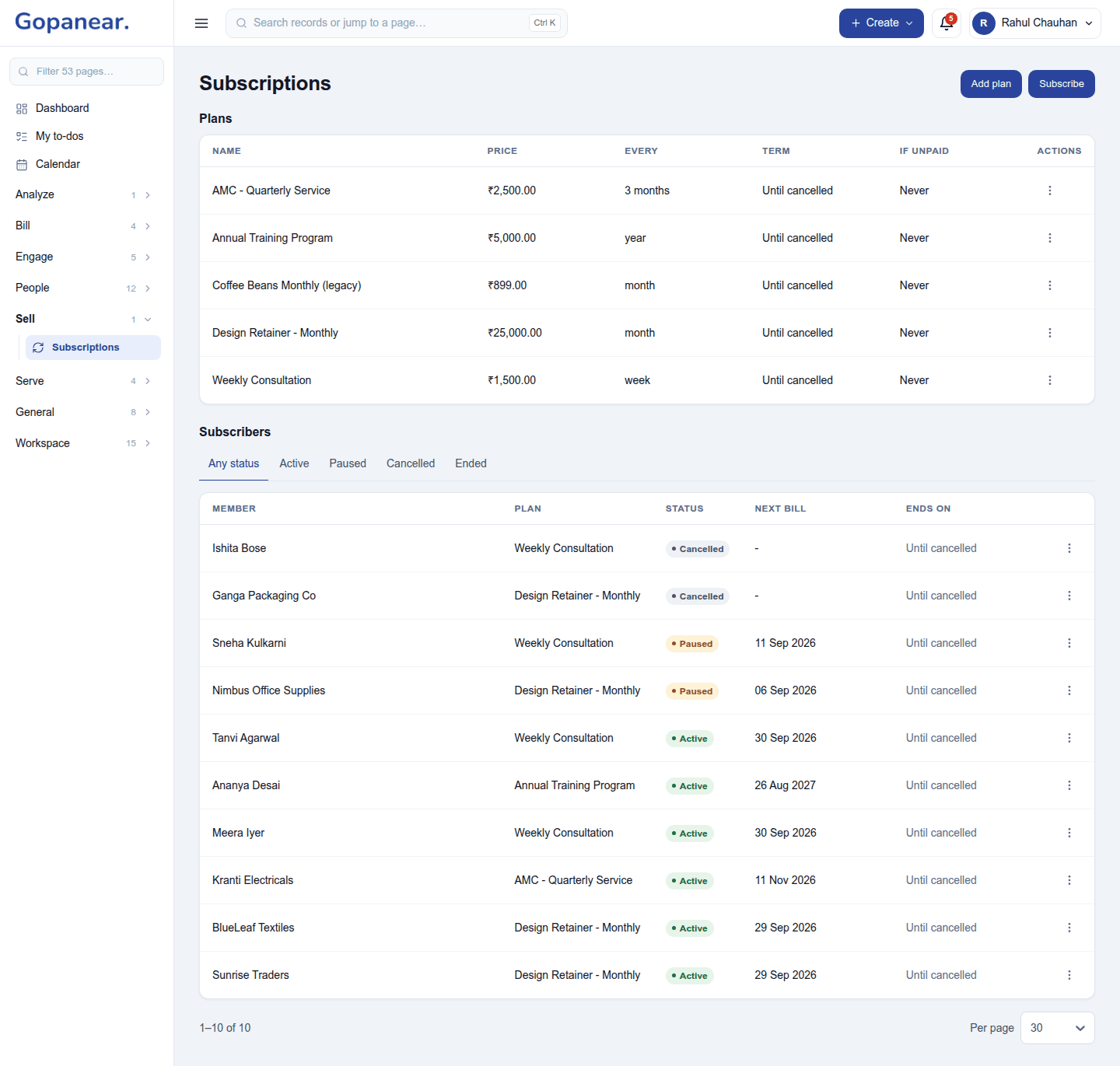
Sell → Subscriptions has two lists.
Plans are what is sold: each with its price, how often it bills (every N weeks, months or years), its term (until cancelled, or a fixed number of periods) and what happens if unpaid. Add plan sets the plan's product and price, and any lines also included in every new subscription (Membership × 1, Locker × 1).
Subscribers are the running subscriptions: who, which plan, what it bills, status, next bill date and when it ends. The status dropdown beside the Subscribers heading filters by Active / Paused / Cancelled / Ended (Any status when cleared). Subscribe starts one: pick the customer and the plan, adjust the lines it bills each period (quantities and agreed prices), and the start date.
A subscriber's ⋮ menu:
- Edit, and Change lines: the next bill and every one after it use the new lines (already-billed periods are not changed).
- Upgrade or downgrade part-way through a term.
- Pause and Resume.
- Bill now: issue the current period's invoice straight away.
- Change customer: hand the subscription to another customer.
- Internal note.
- Cancel: Now - billing stops immediately, or At the end of the period already billed, with a close reason. Keep it running backs out.
Billing
Every day the subscriptions due are billed: an invoice for the period's lines, numbered from the workspace's series, then paid, reminded and reported like any other invoice. A subscription can bill from the start of each period so all its bills fall on the same day of the month. With one invoice per customer per renewal day on, a customer's several subscriptions due the same day share one invoice.
A subscription left unpaid is paused or closed as its plan says. An accepted quotation can start a subscription, and Donations uses subscriptions for recurring gifts.
Automatic payment
A subscriber can have each renewal bill paid by itself, with a card they save once. The card is saved on the payment gateway's own secure page, so it never passes through the workspace, and the money goes into the workspace's own gateway account.
- On the subscription's ⋮ menu choose Automatic payment, then Create set-up link.
- Copy the link and send it to the customer (e-mail, WhatsApp, text). A customer with a portal login can also start it themselves: My subscriptions → ⋮ → Set up automatic payment.
- The customer opens it, presses Set up automatic payment and saves a card on the gateway's page. Nothing is charged then. They come back to a page that says which card will be used.
- From then on, each renewal bill is charged to that card as soon as it is raised. The payment is recorded on the bill with its receipt, exactly as an online payment the customer made.
The Automatic payment dialog shows the card in use ("Visa ending 4242", never the card itself) and, when a charge was declined, why. A declined charge is tried again a day later and two days after that; the bill stays an ordinary unpaid bill meanwhile, and the subscription's own unpaid rules (pause or close after a number of days, under Settings) apply as before. Stop automatic payment removes the saved card at the gateway. A new set-up link replaces the card in use once the customer saves another.
Which gateway saves the card is the one taking the workspace's payments (Settings → Payments):
| Gateway | What the customer approves | At set-up | Each bill |
|---|---|---|---|
| Stripe | A card, on Stripe's page | Nothing is charged | Charged at once |
| PayPal | Their PayPal account, on PayPal's page (PayPal must have approved your account for saving PayPal accounts) | Nothing is charged | Charged at once |
| Braintree | A card, in Braintree's own card fields on a page of ours | Braintree checks the card; nothing is charged | Charged at once |
| Adyen (not rupees) | A card, on an Adyen link page (the customer confirms a zero-value authorisation) | Nothing is charged | Charged at once |
| Razorpay (rupees) | UPI AutoPay or a card, the customer's choice, on Razorpay's page | ₹1 checks it and is refunded once Razorpay confirms the mandate | Razorpay tells the customer first and debits about a day later |
| Cashfree (rupees) | UPI AutoPay, a card or a bank mandate, on Cashfree's page | ₹1 checks it and Cashfree gives it back (a bank mandate takes a day or two to be approved) | Debited the next day (the day after, for a bill raised after 9 pm), after Cashfree tells the customer |
| PayU (rupees) | UPI AutoPay, a card or net banking, on PayU's page | ₹1 checks it and is refunded once PayU confirms the mandate | PayU tells the customer at once and the charge is made two days later; at most ₹15,000 a charge |
CCAvenue publishes no way to charge a saved card, and Adyen in rupees needs Adyen's local Indian processing and its own notice before each debit, which its link pages are not documented to set up; with either the dialog says automatic payment is not available.
Razorpay, Cashfree and PayU need the customer's e-mail address and mobile number on the contact. Their mandates carry the most one charge may take, which the customer sees and approves: twice the subscription's usual bill, at least ₹15,000 and at most ₹1,00,000 (₹15,000 with PayU). A bill above it is declined by the gateway and stays an ordinary bill. For a bill above ₹15,000 the customer's bank may ask them to approve that charge. Razorpay's set-up page does not come back to the workspace, so the dialog shows the card or UPI account within about ten minutes of the customer finishing there. Until an Indian gateway's debit answers, the receipt shows as pending on the bill; a decline it reports later is shown in the dialog but not tried again automatically (Razorpay and Cashfree retry UPI debits themselves). A Stripe restricted key also needs Customers, PaymentIntents and PaymentMethods set to Write, and SetupIntents to Read.
A consolidated renewal bill (several subscriptions of one customer on one bill) is charged once, through the first of them with automatic payment.
Settings
Settings → Subscriptions:
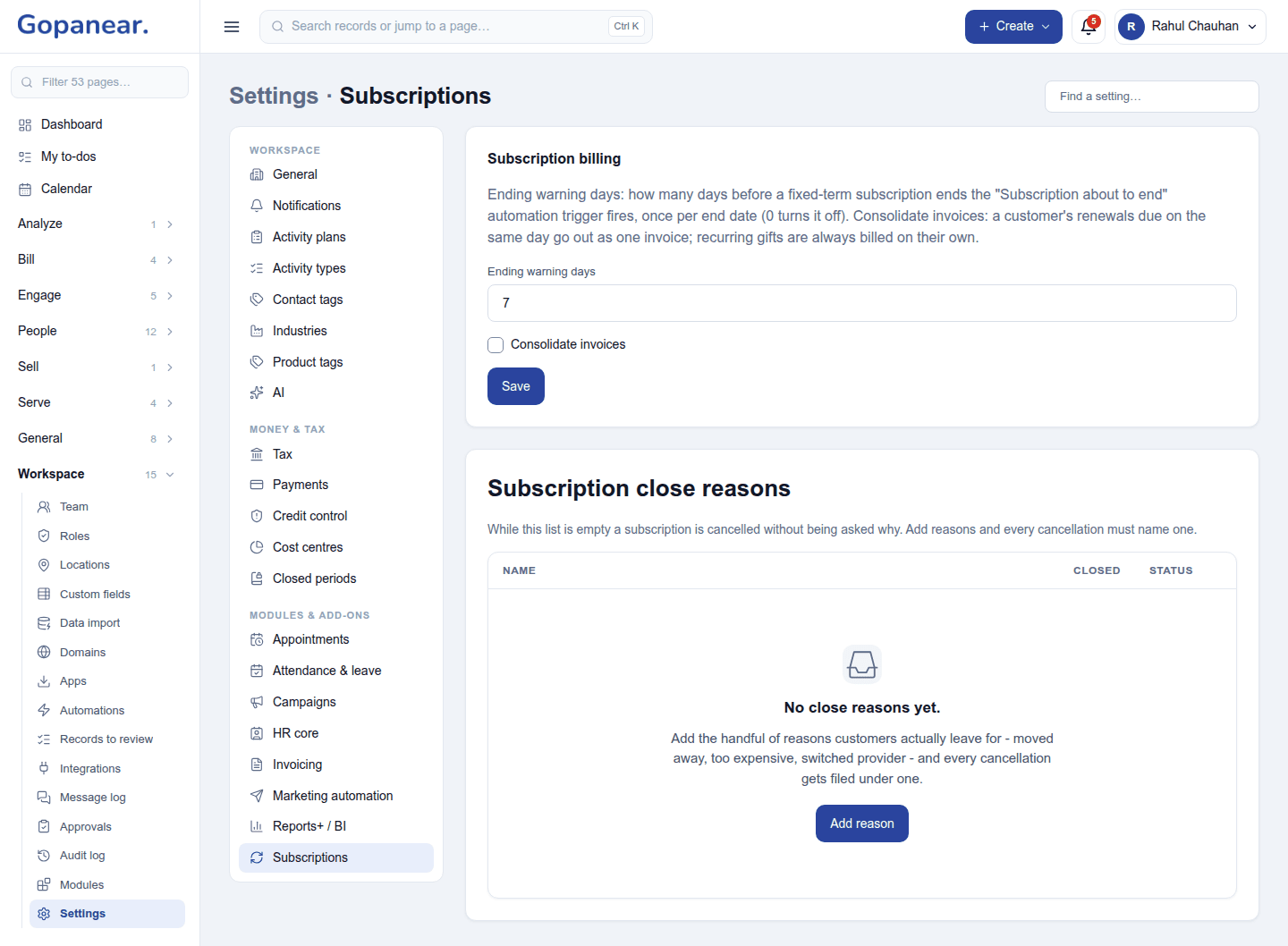
| Card | Setting | Default | What it does |
|---|---|---|---|
| Subscription billing | Ending warning days | 7 | How many days before a subscription ends the owner is told. |
| One invoice per customer per renewal day | Off | Puts a customer's subscriptions due on the same day on one invoice. | |
| Subscription close reasons | (a list) | none | Why subscriptions end (Moved away, Too expensive), asked when one is cancelled. Retire a reason rather than delete one in use. |
Reports
Reports → Subscriptions shows monthly recurring revenue (MRR) and how it moves: new, expansion, contraction and churn.
Permissions
| Permission | Allows |
|---|---|
View subscriptions (subscriptions.view) |
See plans, subscriptions and their billing. |
Manage subscriptions (subscriptions.manage) |
Keep plans; start, change, pause and cancel subscriptions; keep close reasons. |
Ready-made automations
| Name | Kind | What it does | Starts |
|---|---|---|---|
| Call before a subscription ends | Rule | Tells the workspace owner a subscription is about to end, in time to keep the customer. | On |
Turning it off
The screen leaves the menu and billing stops. Plans, subscriptions and invoices already raised are kept.
In the desktop and mobile apps
Not carried.